

SRE writing about cloud, infrastructure and the craft of building reliable systems.
Database - Storage Shrink on Amazon RDS with Blue/Green Deployments

Amazon RDS does not allow you to directly reduce the allocated storage of an existing instance. To decrease it, you must migrate to a smaller storage configuration — and Blue/Green Deployments lets you do that in a managed way, with low downtime.
This article explains the process, step by step: measuring the opportunity, sizing the target, switching over and automating with checks.
The Problem: the Storage Ratchet Effect
On RDS, storage only grows. You can increase it at any time, but not reduce it.
This behavior has a name: the ratchet effect. Every increase, whether from an incident or a spike, becomes permanent.
Imagine renting a whole warehouse to store your moving boxes: the boxes leave, but the rent stays. Before Blue/Green, giving the warehouse back required a manual migration, with a hand-run cutover: slow, error-prone and hard to scale.
Measuring the Opportunity
For each instance, collect three things:
FreeStorageSpacefrom CloudWatch: how much is free;- allocated storage: how much is being paid for;
- storage autoscaling: whether it’s on and its ceiling (
MaxAllocatedStorage).
Then rank the databases by occupancy:
For example, an instance with 1,000 GiB allocated and 870 GiB free is at 13% occupancy.
A good starting cutoff: occupancy below 25% and more than 50 GiB allocated.
The Options
| Option | Downtime | For many instances |
|---|---|---|
| Do nothing and wait for growth to fill the storage | none | idle storage keeps being paid for until it’s used |
| Restore a snapshot to a smaller instance | not applicable | doesn’t work: RDS can’t restore a snapshot with less storage than the original |
Manual migration (pg_dump/mysqldump, AWS DMS, native replication) | long window, hand-run cutover | too much coordination and risk per database |
| Blue/Green with shrink | short switchover | managed by AWS and automatable via API |
Blue/Green meets both requirements: short switchover, same endpoint and everything via API.
Blue/Green on Amazon RDS
AWS creates a copy of production (green) and keeps it in sync through replication. On switchover, green takes over blue’s name and endpoint, and the old one becomes -old1.
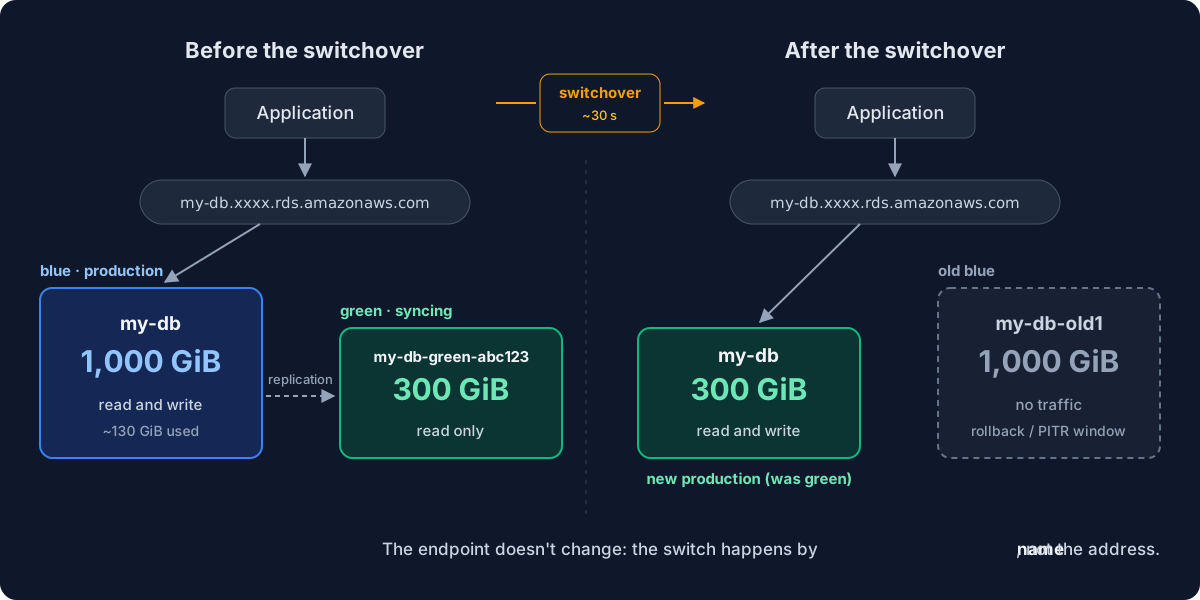
Since November 2024, green can be created with less storage (PostgreSQL 12+, MySQL 5.7+, MariaDB 10.4+). That’s what makes the process possible.
Replication
Green stays in sync through the binlog on MySQL and MariaDB, and through the WAL on PostgreSQL (physical replication), with green replaying the change log. For the shrink, use physical replication, with no upgrade at the same time. PostgreSQL also has logical replication, used for major upgrades, but it has restrictions with DDL, large objects and tables without a primary key.
Anatomy of the Switchover
During the switchover, RDS:
- Runs the guardrails, checking that both environments are ready.
- Blocks writes and drops connections in both environments.
- Waits for replication to catch up with blue.
- Renames instances and endpoints: green takes over blue’s name.
- Allows writes on the new production.
Writes are paused between steps 2 and 5, which is why no data is lost during the switchover.
If the conditions aren’t met within the timeout (300 s by default), the switchover is aborted and nothing changes.
The Process
Sizing the Target Storage
A simple rule: 2× the used storage, rounded up to multiples of 50 GiB, with autoscaling on. Example: 130 GiB used → 260 → 300 GiB. The 2× factor leaves headroom, and autoscaling grows it if needed.
Why Automate
For one database, Blue/Green is simple. For many, the manual process becomes the problem:
- Too many steps: eligibility, target, creation, copy, switchover, restart and cleanup, for every database.
- Error-prone: wrong target, high lag at switchover or a forgotten restart.
- No traceability: by hand, nothing gets recorded. In an orchestration, every run’s data is auditable.
The Orchestration
Each run takes the RDS name, the target storage and the environment, and you can trigger one or many in parallel.
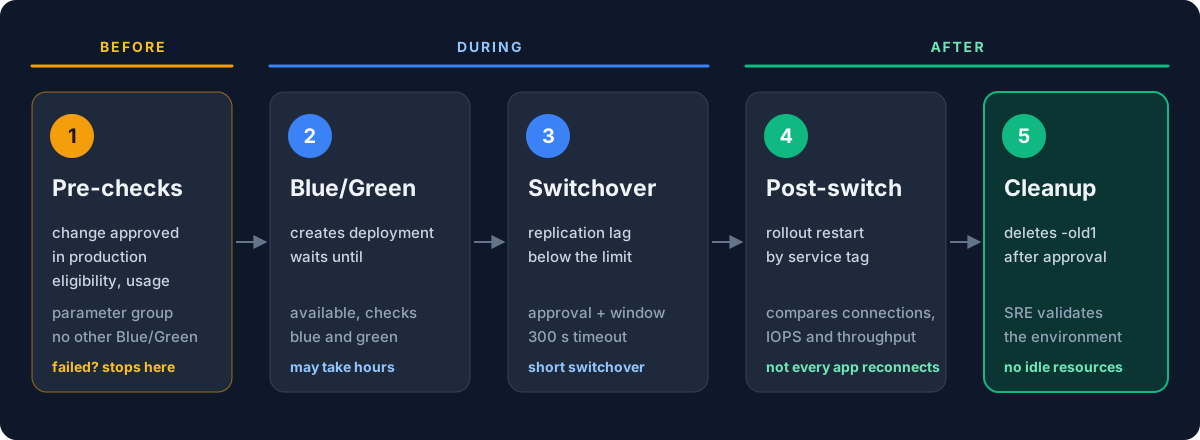
- Change validation: in production, it only proceeds with an approved change.
- Parallel pre-checks: resolves the RDS by name and validates eligibility, actual storage usage, that no other Blue/Green is in progress, and that the parameter group is in sync with the required parameters. If anything fails, it stops here.
- Blue/Green: creates the deployment, waits for it to become available and validates the blue and green instances.
- Switchover: after approval, only switches with replication lag below a defined limit (for example, 60 s).
- Post-switchover: runs a rollout restart of the services and compares replication lag, connection pool, IOPS and throughput with the previous state.
- Cleanup: deletes
-old1only after manual approval, once the environment is validated.
These steps apply to any operation supported by RDS Blue/Green, such as version upgrades and scaling.
Watch Outs
- Instance limits per AZ and architecture (ARM). Each Blue/Green creates extra instances. Check limits and availability before each batch.
- Supported engines and versions. Only PostgreSQL 12+, MySQL 5.7+ and MariaDB 10.4+.
- Low usage with more than 400 GiB allocated. On gp3, from 400 GiB the baseline is 12,000 IOPS; below that, it drops to 3,000 IOPS. It may have been sized for IOPS: check
ReadIOPSandWriteIOPS. - Best time for each product. Writes stop during the switchover: agree on the window with the team.
- Cost while Blue/Green is active. Green and blue are billed together while the deployment exists, and
-old1until it's deleted. - Application reconnection. Not every application has automatic reconnection configured: plan a rollout restart after the switchover.
- Slow queries on MySQL. The new database may take over with outdated statistics: run
ANALYZE TABLEafter the switchover. - Terraform drift. The RDS state doesn't change; only the allocated storage diverges from the value declared in the code. One way out is reading the current storage with a
datasource in the module.
The Execution
Work in small batches to limit the impact. Create the Blue/Greens ahead of time, because the shrink copy takes hours. Run switchovers one database at a time, in the agreed window, watching performance before and after.
The flow fits in four commands:
# 1. Create the green with less storage
aws rds create-blue-green-deployment \
  --blue-green-deployment-name my-db-shrink \
  --source arn:aws:rds:us-east-1:123456789012:db:my-db \
  --target-allocated-storage 300

# 2. Track the shrink progress on the green
aws rds describe-db-instances \
  --db-instance-identifier my-db-green-abc123 \
  --query 'DBInstances[0].[DBInstanceStatus,PercentProgress]'

# 3. Switch over
aws rds switchover-blue-green-deployment \
  --blue-green-deployment-identifier bgd-xxxxxxxxxxxx \
  --switchover-timeout 300

# 4. Delete the deployment (the new production and -old1 keep existing)
aws rds delete-blue-green-deployment \
  --blue-green-deployment-identifier bgd-xxxxxxxxxxxx
Conclusion
Amazon RDS Blue/Green Deployments solves what used to require a manual migration: shrinking storage with a short, safe switchover. With an orchestration that checks before, during and after, it becomes a repeatable process.
If your databases only grow, start by comparing allocated versus used.
Reviewers
References
- Amazon RDS Blue/Green Deployments support storage volume shrink - AWS What’s New, Nov. 2024
- Shrink storage volumes for your RDS databases and optimize your infrastructure costs - AWS Database Blog
- Overview of Amazon RDS Blue/Green Deployments - Amazon RDS User Guide
- Switching a blue/green deployment in Amazon RDS - Amazon RDS User Guide
- Limitations and considerations for Amazon RDS blue/green deployments - Amazon RDS User Guide
- Amazon RDS DB instance storage - Amazon RDS User Guide
SRE writing about cloud, infrastructure and the craft of building reliable systems.